
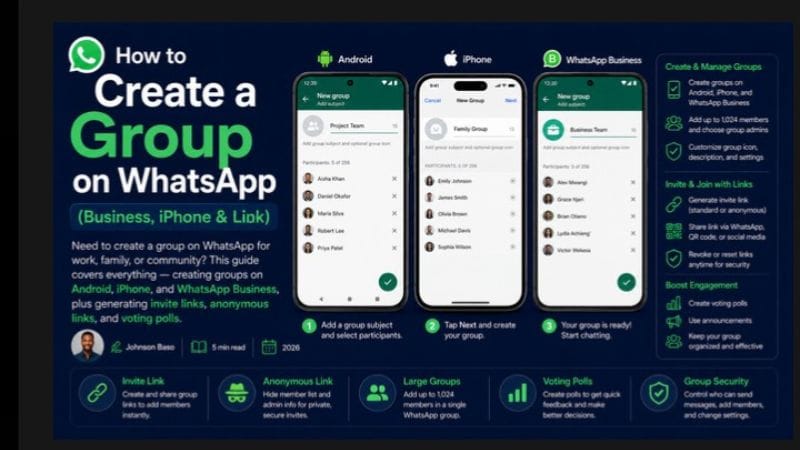
How to Create a Group on WhatsApp (2026 Guide)
Step-by-step for Android, iPhone, and WhatsApp Business — plus invite links, QR codes, permissions, and FAQs.
✅ Why Trust This Guide
- Nigerian-focused — based on official WhatsApp documentation
- Updated November 2026
- Menu names may vary slightly by device and app version
📚 Official source: WhatsApp Help Center — Creating and inviting people to groups
📌 Key Takeaways
- ✅ You can create a WhatsApp group on Android, iPhone, and Business in under a minute
- ✅ Groups support up to 1,024 members in 2026
- ✅ You can share via invite link or QR code, and control who can message
- ✅ @everyone availability depends on the WhatsApp feature rollout and group type
📌 Quick Answer
How do I create a group on WhatsApp?
Android: Open WhatsApp → ⋮ → New group →
Select contacts → Enter group name → Create.
iPhone: New Chat → New Group → Select contacts → Next →
Name group → Create.
WhatsApp Business: similar steps.
Step-by-Step: Create a WhatsApp Group
On Android
- Open WhatsApp → Tap ⋮ → New group.
- Select at least one contact, then tap the green arrow.
- Enter a group name and optionally add a group icon.
- Tap Create.
On iPhone
- Tap New Chat → New Group.
- Select contacts → Next.
- Name your group → Create.
On WhatsApp Business
The basic group-creation process is similar on WhatsApp Business, although menu placement may vary by app version and device.
Group Invite Link & QR Code
How to Create a Group Invite Link
- Open the group → Tap the group name at the top.
- Scroll to "Invite to Group via Link."
- Tap Copy Link or Share Link.
- You can also Reset Link to revoke access.
How to Access the Native QR Code
- Open the group → Tap the group name.
- Tap Invite via Link or QR Code.
- Tap QR Code.
- Show the code for others to scan.
Using WhatsApp Groups for Business?
If you're creating WhatsApp groups because you sell products or services, the next skill is turning group chats and Status views into actual paying customers. WhatsApp Sales Blueprint 2.0 teaches the scripts, follow-up process, and closing strategies Nigerian sellers use.
Affiliate link. No income is guaranteed.
Group Permissions & Admin Controls
As a group admin, you control several important settings:
- Who can send messages: All participants or only admins (announcement group)
- Who can edit group info: All participants or only admins
- Who can add members: All participants or only admins
- Approval to join: Turn on admin approval for new members
- Disappearing messages: Set messages to disappear after a chosen duration
To access these settings: Open the group → Tap the group name → Group Permissions.
⚠️ @everyone Clarification: In standard groups, you can tag specific members by typing @ and selecting their name. The @everyone tag may be available in some group types (like Communities announcement groups) depending on the WhatsApp feature rollout. Check your app's current options.
For a deeper walkthrough, see our dedicated guide on how to tag everyone in a WhatsApp group.
How to Make Someone a Group Admin
- Open the group → Tap the group name.
- Scroll to Participants.
- Tap the person you want to make admin.
- Tap Make group admin.
WhatsApp Communities vs Groups: What's the Difference?
WhatsApp Groups and Communities serve different purposes:
| Feature | Group | Community |
|---|---|---|
| Structure | Single group chat | Multiple related groups |
| Announcements | Group permissions | Community announcement space |
| Best for | Focused discussions | Larger organizations and multiple groups |
When to use a Group: You need a simple, focused chat for a
small number of people.
When to use a Community: You need to manage multiple
sub-groups and broadcast important announcements to everyone.
How to Create a Poll in a WhatsApp Group
- In the group chat, tap 📎 (Android) or + (iPhone).
- Select "Poll."
- Type your question, add answer options.
- Tap Send. Members can vote instantly.
Business & Community Use Cases
- Announcement groups: Set "Only admins can send messages" to broadcast updates, offers, or news.
- Customer support groups: Use labels and quick replies to manage customer inquiries.
- Community structures: Use Communities for schools, churches, and brands that need multiple sub-groups.
📄 Turn WhatsApp Group Members into Customers
Now that you know how to create a group, learn how to use WhatsApp to actually earn. Read our free guide to making money on WhatsApp in Nigeria — 7 legitimate methods, no fake promises.
READ THE FREE WHATSAPP MONEY GUIDE 7 methods · No payment requiredFrequently Asked Questions
How many people can be in a WhatsApp group in 2026?
In 2026, a WhatsApp group can have up to 1,024 members, including admins. This limit is the same on Android, iPhone, and WhatsApp Web.
Can I create a WhatsApp group without adding contacts?
Depending on your WhatsApp version and device, you may be able to create the group and add members later. If your version requires you to select a participant during setup, add one temporarily and manage the members afterward.
How do I create a WhatsApp group link?
Open the group → Tap the group name → Tap "Invite to Group via Link" → Copy Link or Share Link. You can also Reset Link to revoke access.
How do I make someone an admin in a WhatsApp group?
Open the group → Tap the group name → Participants → Tap the person → Make group admin.
What is the difference between WhatsApp Community and Group?
A Group is a single chat with up to 1,024 members. A Community can contain multiple related groups under one umbrella, with an announcement channel where broadcast messages can be sent.
How do I tag everyone in a WhatsApp group?
@everyone availability depends on the WhatsApp feature rollout and group type. In standard groups, you can tag specific members by typing @ and selecting their name. See our full guide →
How do I create a QR code for my WhatsApp group?
Open the group → Tap the group name → Invite via Link or QR Code → Tap QR Code → Show the code for others to scan.
Can I create a WhatsApp group for my business?
Yes. Use WhatsApp Business or standard WhatsApp. Set permissions so only admins can post (announcement group) or allow member interaction. Link to your catalog and payment options for selling.
Want the Complete WhatsApp Income System?
WhatsApp Millionaire Secrets is the most complete WhatsApp-focused course we've reviewed for the Nigerian market — covering Status content, conversations, offers, and follow-up in one structured system.
Affiliate link. No income is guaranteed.