
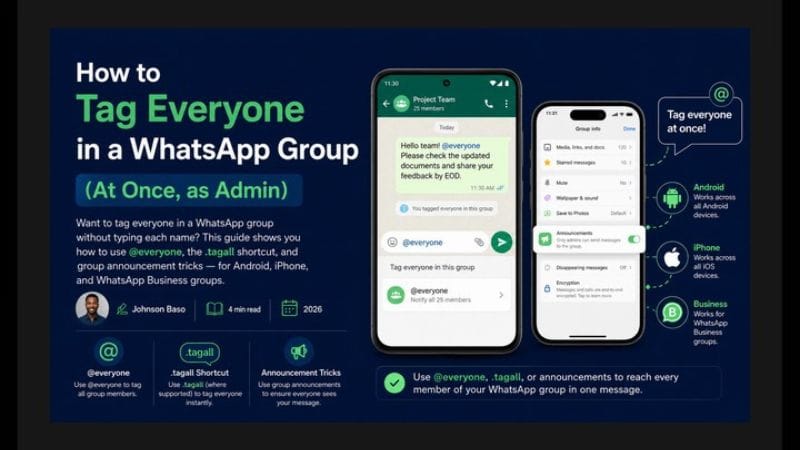
How to Tag Everyone in a WhatsApp Group (2026 Step-by-Step Guide)
Learn how to mention all members in a WhatsApp group using the official method, what @all means, why it may not show up, and manual fallback options.
✅ 2026 Official WhatsApp Notes
- Official mention method: Type @ in a group chat and select a member's name to mention them specifically.
- Mention all: WhatsApp may provide a mention-all option in some versions. Availability can vary by rollout, app version, and account.
- Not universal: The exact name and availability of the feature may vary. If you don't see it, use the manual method explained below.
- Source: Based on WhatsApp's official Help Center. Menu names and features may change as WhatsApp updates its app.
📌 Quick Answer
To tag everyone in a WhatsApp group, type @ in the message box. If your WhatsApp version shows an @all, Everyone, or similar option, select it to mention all members at once.
If you don't see the option, type @ and manually select the members you want to mention.
What Does "Tag Everyone" Mean in WhatsApp?
"Tagging everyone" means mentioning multiple members of a WhatsApp group so they can easily notice an important message. This can be useful for announcements, reminders, events, classes, teams, and customer communities.
- Mention a specific member: Type @ and select their name.
- Mention everyone: If your version provides the feature, select the available Everyone or mention-all option.
- Manual tagging: If the feature is unavailable, mention members individually.
Official Method 1: Mention Specific Members
Mentioning individual members is the most dependable method because it does not depend on whether your account has received a newer mention-all feature.
Steps to Mention a Specific Member
- Open the WhatsApp group.
- Tap the message box.
- Type @.
- Select the member's name from the list.
- Write your message.
- Tap send.
Mention notifications can behave differently depending on WhatsApp's notification settings and the recipient's device.
Official Method 2: Mention All Members — If Available
Some WhatsApp users may see a feature that allows a group-wide mention. Depending on your version, it may appear as @all, Everyone, or another similar option.
How to Check for the Mention-All Option
- Open the WhatsApp group.
- Tap the message field.
- Type @.
- Look through the member suggestions.
- If Everyone, @all, or a similar option appears, select it.
- Write your announcement and send it.
⚠️ Feature availability varies: If you cannot see the mention-all option, don't assume something is wrong with your phone. WhatsApp features can be introduced gradually and may differ between accounts and app versions.
Manual Fallback: Tag Members One by One
If you don't have a mention-all option, you can still mention multiple members manually.
- Open the WhatsApp group.
- Type @.
- Select the first member.
- Type @ again.
- Select the next member.
- Repeat for the members you need to notify.
- Send the message.
This method takes longer in a large group, but it does not require a separate tagging app or third-party bot.
Why Can't I See the @all or "Everyone" Option?
There are several possible reasons why you cannot see a mention-all option in your WhatsApp group.
- WhatsApp needs an update: Check the Play Store or App Store.
- Gradual rollout: The feature may not yet be available to your account.
- Account or group restrictions: Availability may depend on your WhatsApp version or group configuration.
- Platform differences: Android and iPhone versions may not always receive features simultaneously.
- Feature name changes: WhatsApp may change how the option appears.
✅ What to do: Update WhatsApp, restart the app, and check again. If the feature still isn't available, use individual mentions instead.
Turn WhatsApp Attention Into Income
Knowing how to tag everyone is one skill. Learning how to turn group and Status attention into actual paying customers is what actually earns money. WhatsApp Sales Blueprint 2.0 teaches the sales scripts, follow-up process, and closing strategies that Nigerian sellers are using.
EXPLORE WHATSAPP SALES BLUEPRINT 2.0 ₦20,000 · ExpertnaireDisclosure: This is an affiliate link. ClickStartNG may earn a commission if you purchase through this link, at no additional cost to you.
WhatsApp Business: Tagging Customers and Group Members
WhatsApp Business can also be useful for managing customer communities, seller groups, support groups, and business teams.
- Product announcements: Tell customers about new products or restocks.
- Flash sales: Alert interested customers about a limited offer.
- Event updates: Keep participants informed.
- Customer support: Bring attention to important information.
- Team communication: Notify staff about important changes.
⚠️ Don't overuse group mentions: Frequent group-wide notifications can annoy members. Use them when the information is genuinely important.
Best Practices for WhatsApp Group Admins
- Use mentions sparingly: Save them for important information.
- Keep announcements clear: Say exactly what members need to know.
- Avoid unnecessary tagging: Don't mention everyone for ordinary conversation.
- Respect members: Too many notifications can cause people to mute or leave.
- Use a clear group purpose: Members should understand why the group exists.
Practical Nigerian Use Cases
- Class groups: Notify students about assignments, examinations, and deadlines.
- Church and community groups: Share important announcements and event information.
- Business groups: Notify customers about new products, prices, or availability.
- Event groups: Coordinate weddings, meetings, training sessions, and other events.
- Small business teams: Share urgent operational updates with staff.
Want the Complete WhatsApp Income System?
WhatsApp Millionaire Secrets is the most complete WhatsApp-focused course we've reviewed for the Nigerian market — covering Status content, conversations, offers, and follow-up in one structured system.
EXPLORE WHATSAPP MILLIONAIRE SECRETS ₦25,000 · ExpertnaireAffiliate link. No income is guaranteed — results depend on your effort and market.
Frequently Asked Questions
How do I tag everyone in a WhatsApp group?
Type @ in the message box. If your WhatsApp version provides an Everyone or @all option, select it. Otherwise, mention members individually by typing @ and selecting their names.
Is @all the same as tagging everyone?
It can serve the same purpose where the mention-all feature is available. However, the exact wording and availability can vary between WhatsApp versions.
Why can't I see the @all option?
Your app may need an update, or the feature may not yet be available to your account. WhatsApp features can roll out gradually.
Can I manually tag everyone?
Yes. Type @ and select each member's name individually before sending your message.
Can I tag people in WhatsApp Business?
WhatsApp Business supports group mentions. The availability of newer mention-all features can depend on your version and account.
Does .tagall work on WhatsApp?
.tagall is not a standard WhatsApp command. Avoid installing unknown third-party tools simply because they claim to provide an automatic tagging feature.
Does tagging everyone bypass muted groups?
Mentions can receive special notification treatment, but the exact behavior can depend on WhatsApp's current notification system and the recipient's settings.
See our guide on how to make money on WhatsApp in Nigeria — 7 legitimate methods, no fake promises.