
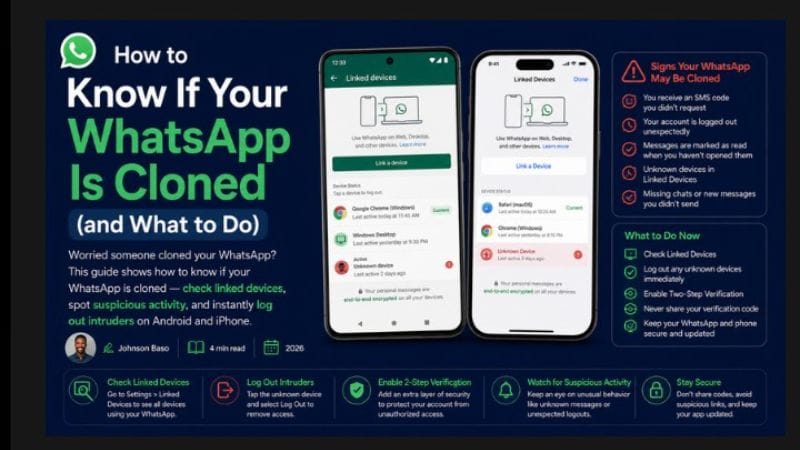
How to Know If Your WhatsApp Is Cloned (and What to Do)
Worried someone cloned your WhatsApp? This guide shows how to know if your WhatsApp is cloned — check linked devices, spot suspicious activity, and instantly log out intruders on Android and iPhone.
✅ Quick Answer: How to Check If Your WhatsApp Is Cloned
Open WhatsApp → Settings → Linked Devices. If you see any device you don't recognise, your WhatsApp has been cloned. Tap the unknown device and select "Log Out" to remove it immediately. Also enable two‑step verification for extra security.
5 Signs Your WhatsApp Might Be Cloned
- Unknown devices in Linked Devices: Go to Settings → Linked Devices and check for anything suspicious.
- Messages you didn't send: Friends asking about messages you didn't type.
- You're logged out unexpectedly: If someone clones your account via phone number, you'll be logged out.
- Verification code you didn't request: Receiving a WhatsApp SMS code without requesting it means someone is trying to access your account.
- Unusual activity at odd hours: "Last seen" times that don't match your usage.
How to Check Linked Devices on Android
- Open WhatsApp → Tap ⋮ → Linked Devices.
- Review the list. Any device you don't recognise is a cloned session.
- Tap the unknown device → Log Out.
How to Check Linked Devices on iPhone
- Open WhatsApp → Settings → Linked Devices.
- Check for unknown devices.
- Tap any suspicious device → Log Out.
What to Do Immediately If You're Cloned
- Log out all unknown devices from Linked Devices.
- Enable two‑step verification: Settings → Account → Two‑Step Verification → Enable.
- Change your WhatsApp PIN if you had one set.
- Warn your contacts that someone may be impersonating you.
⚠️ Never share your WhatsApp verification code with anyone. No legitimate company or friend will ever ask for it. If someone does, they're trying to clone your account.
Frequently Asked Questions
Yes — if they get your verification code (via SIM swap or social engineering), they can register your number on their device. Two‑step verification prevents this.
Not directly. But you may receive an unexpected verification code, or see a new device in Linked Devices. Regularly checking Linked Devices is the best defence.
📘 Popular Guides on ClickStart NG
Explore More WhatsApp Guides & Online Income Tips
Now that your account is secure, discover how Nigerians earn real money through WhatsApp status, TV channels, and affiliate marketing.