
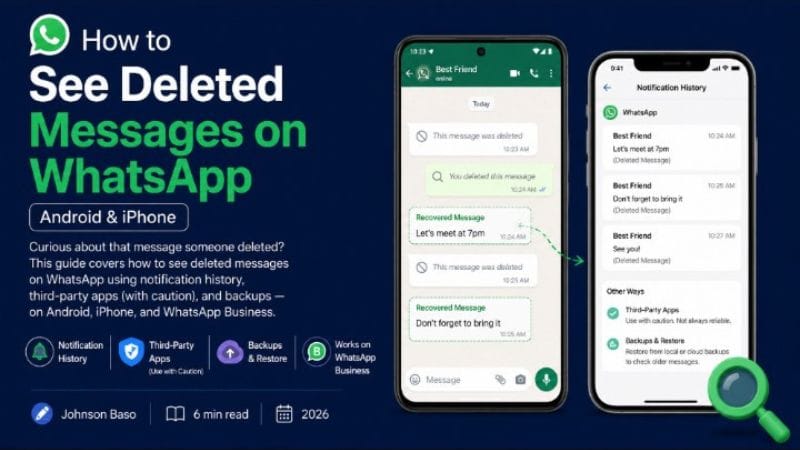
How to See Deleted Messages on WhatsApp (Android, iPhone, Business & Laptop)
Curious about that message someone deleted? This guide covers how to see deleted messages on WhatsApp using notification history, backups, and linked devices — on Android, iPhone, Redmi, WhatsApp Business, and even your laptop. Plus the third-party apps to avoid.
📋 In This Guide
- Quick Answer
- Method 1: Android Notification History
- Method 2: iPhone (Backup Restore)
- Method 3: Redmi / Xiaomi (Notification History)
- Method 4: WhatsApp Business
- Method 5: Laptop / WhatsApp Web / Desktop
- Method 6: See Messages Deleted by Sender
- Third-Party Apps (Use With Caution)
- Frequently Asked Questions
✅ Quick Answer: How to See Deleted WhatsApp Messages
Android (11+): Go to Settings → Apps → Notifications → Notification History and enable it. Deleted WhatsApp messages will appear there. iPhone: No built-in method — you can only restore an iCloud backup. Laptop: Check WhatsApp Web or Desktop before it syncs. WhatsApp Business: Same methods as regular WhatsApp. Third-party apps exist but carry serious privacy risks.
Method 1: Android Notification History (No App Needed)
Android 11 and above have a built-in notification log that captures messages before they're deleted.
- Go to Settings → Apps & Notifications → Notifications.
- Tap "Notification history" (or "Notification log").
- Toggle it ON.
- From now on, any WhatsApp message that arrives — even if later deleted — will appear in this log.
To view a deleted message, open Notification History and scroll to the WhatsApp section. You'll see the text of messages that were deleted by the sender.
⚠️ Important: Notification History only works from the moment you enable it — it doesn't recover messages deleted before you turned it on. Enable it today so you're covered going forward.
Method 2: iPhone — Restore From iCloud Backup
iPhone doesn't have a notification history feature. Your options are limited to backup restore and linked devices.
- Uninstall WhatsApp from your iPhone.
- Reinstall WhatsApp and verify your number.
- When prompted, tap "Restore" to restore your chat history from iCloud.
- Once restored, open the chat — the deleted message should be visible.
⚠️ Warning: This replaces your current chats with the backup version. Any messages received after the backup will be lost unless you back them up first. Open WhatsApp → Settings → Chats → Chat Backup → Back Up Now before restoring an older backup.
Method 3: Redmi / Xiaomi / POCO (MIUI Notification History)
Redmi, Xiaomi, and POCO phones use MIUI, which has a slightly different setting location than stock Android.
- Open Settings on your Redmi/Xiaomi/POCO phone.
- Tap "Notifications & Control Center" (or just "Notifications").
- Scroll down and find "Notification history".
- Toggle it ON.
- View deleted messages anytime from the same menu.
If your MIUI version doesn't show "Notification history," try searching for it in the Settings search bar — Xiaomi keeps moving it between MIUI versions.
Method 4: WhatsApp Business
WhatsApp Business uses the exact same notification system as regular WhatsApp. The methods above work identically for WhatsApp Business.
- Android (any version): Notification History method works
- iPhone: iCloud backup restore method works
- Redmi/Xiaomi: MIUI Notification History works
One additional tip: WhatsApp Business has a Chat Backup option (Settings → Chats → Chat Backup) — back it up daily if you regularly need to recover messages.
Method 5: Laptop / WhatsApp Web / WhatsApp Desktop
If you have WhatsApp Web or WhatsApp Desktop open on your laptop when a message arrives, it's possible to recover it — if you don't sync immediately.
- Keep WhatsApp Web/Desktop open on your laptop.
- When a sender deletes a message, it disappears from your phone but may still appear briefly on your laptop screen.
- Take a screenshot immediately (Windows:
PrtScnorWin + Shift + S, Mac:Cmd + Shift + 4). - Once your phone syncs the deletion, the message will disappear from the laptop too — so speed matters.
⚠️ Reality check: This only works if the message was already displayed on your laptop before the sender deleted it. If you open WhatsApp Web after deletion, the message is already gone.
Method 6: See Messages Deleted by Sender (Most Searched)
This is one of the most-searched questions: "How to see messages deleted by sender on WhatsApp". The honest answer:
- Android 11+: Use Notification History (Method 1) — this captures messages the moment they arrive, so deleted-by-sender messages stay in your notification log.
- iPhone: Only via iCloud backup restore (Method 2). There is no other built-in way.
- Redmi/Xiaomi: Use MIUI Notification History (Method 3).
- Laptop: Only if you had WhatsApp Web open at the time (Method 5).
💡 Best strategy: Enable Notification History on your phone today. From that point on, every deleted-by-sender message will be recoverable. There's no way to recover messages deleted before you enable it.
Using WhatsApp for Business? Learn the Real Sales System
Since you're clearly a heavy WhatsApp user, you might be using it for business — selling products or services. If you are, the next skill is learning how to turn Status views and chats into actual paying customers. WhatsApp Sales Blueprint 2.0 teaches the scripts, follow-up process, and closing strategies Nigerian sellers use.
Affiliate link · No income is guaranteed
Third-Party Apps (Use With Extreme Caution)
Apps like WhatsRemoved+ and Notisave can detect deleted WhatsApp messages by reading your notifications. However:
- They require full access to your notifications and may collect personal data.
- They are not officially endorsed by WhatsApp.
- On iPhone, these apps are extremely limited due to Apple's privacy restrictions.
- Some third-party "recovery" apps are outright malware — they steal data rather than help you.
🚨 Privacy risk: Third-party apps can potentially access every message you receive — not just deleted ones. They may collect bank details, OTPs, and personal conversations. The Android Notification History method is safer because it's built into your phone's OS by Google, not a third-party developer.
WhatsApp Millionaire Secrets
If you're using WhatsApp for more than chatting — actually trying to build an income — this is the most complete WhatsApp business system we've reviewed. Covers Status content, conversations, offers, follow-up, and scale.
Affiliate link · No income is guaranteed
Frequently Asked Questions
On Android 11+ (including Redmi, Xiaomi, POCO, Samsung, and Tecno), yes — use the built-in Notification History. On iPhone, there's no built-in way without restoring a backup.
iPhone doesn't have a notification history. The only reliable method is restoring a recent iCloud backup. If you have WhatsApp Web or Desktop open at the time, you can screenshot the message before sync.
On MIUI: Settings → Notifications & Control Center → Notification history → Toggle ON. It works the same as stock Android. Just enable it before the message is deleted.
Yes — the same methods apply. WhatsApp Business uses the same notification system as regular WhatsApp. Android Notification History works identically.
Only if the message was already displayed on your laptop screen before the sender deleted it. Once your phone syncs the deletion, the message disappears from WhatsApp Web too. Take a screenshot immediately if you want to preserve it.
Some do, but they rely on reading notifications. Once a message is deleted by the sender, WhatsApp removes it from their servers. The apps capture what was displayed before deletion. These apps also pose privacy risks — they can access every message you receive.
Your WhatsApp Is Set Up. Now Let's Make It Earn.
Now that you know how to see deleted messages, learn how thousands of Nigerians are using WhatsApp to earn real income — no fake apps, no account linking, no scams.
Ready to build your website? See packages and get a free mockup →